


USAA Mobile
4.766.14K Reviews
App Specs
- Version
- 11.16.2
- Updated On
- License
- Free
- Downloads
- 10,000,000+
- Developer
- USAA
- Categories
- Finance
- Platform
- Android, iOS
Screenshots


 Analysis by AppCompare
Hey there! If you’re like me, juggling finances while on the go, you might’ve heard about the USAA Mobile app. I’ve been diving into this app to see what it’s all about, and I’m here to spill the tea on everything it offers. Let’s get into it!
Choosing a financial app that fits
When I choose a finance app, I first ask what I actually need to do from my phone. If the main jobs are checking balances, handling routine banking, and keeping insurance details nearby, a single place for those tasks can be more useful than a specialist app with a narrower focus. USAA Mobile is built around access to USAA insurance, banking, and investment accounts, so its strongest case is convenience for people who already use those services.
That focus matters. This is not the same kind of choice as a dedicated budgeting tool or an investment platform designed around research and portfolio analysis. I would judge it by how easily it helps me handle everyday account tasks, not by whether it replaces every financial service I might use. The app is free, and its Everyone content rating makes it broadly accessible, but access to the relevant USAA services still depends on being a customer.
Getting Started with the USAA Mobile App
First things first, getting the USAA Mobile app onto your device is a breeze. It’s available for both Android and iOS, so no matter your preference, you’re covered. Once downloaded, logging in is straightforward. If you’re already a USAA member, just pop in your credentials. If not, you’ll need to sign up, which is relatively painless.
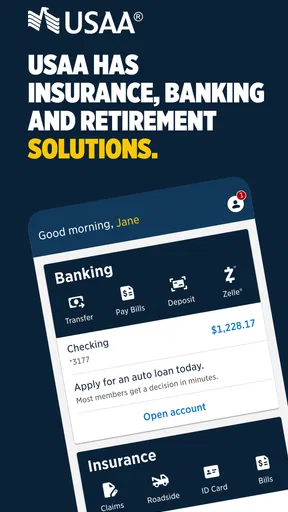
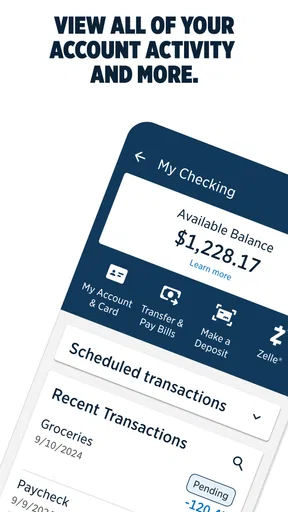
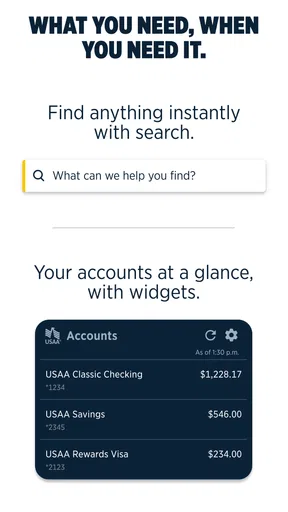
The app’s layout is clean and intuitive, making it super easy to navigate. I appreciate that it doesn’t bombard you with unnecessary information right off the bat. Instead, it provides a neat dashboard where you can see your balances and recent transactions at a glance.
USAA Mobile is a finance app from USAA, currently at version 11.10.2, and it has an average rating of 4.7 from around 470,000 ratings. Its reach is substantial, with over 10 million installs. Those figures suggest many people find it useful, but I’d still base my decision on whether its USAA-centered setup matches my own accounts and routines.
Where the all-in-one approach helps
USAA Mobile is packed with features that make managing your finances on the fly a total cinch. Here are a few highlights that stood out to me:
Worth Reading Before You Choose

EA SPORTS FC Mobile 26 Is a Bigger Football Game, but It Takes Time

Flipboard Shows What News Apps Must Do Beyond the Feed

Switching to Android Auto Means Rethinking Your Driving Routine

Google Calendar Makes a Crowded Week Easier to Manage

Ludo King Makes the Most of the Minutes Between Plans

Baby Panda World Brings Quick Play to Modern Phones, but Its Game Library Feels Busy
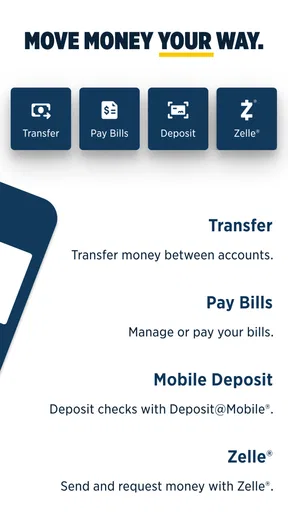
- Account Management: You can view all your accounts, including checking, savings, and credit cards. It’s super easy to transfer money between accounts or pay your bills directly from the app.
- Mobile Deposit: This feature is a lifesaver. Snap a pic of your check and boom, it’s deposited. No more trips to the bank.
- Security Features: With Touch ID and Face ID support, your financial info is safe and sound. Plus, you can easily set up alerts for suspicious activity.
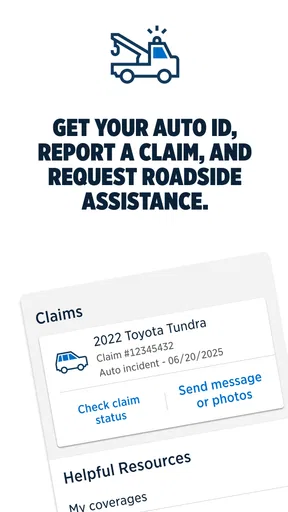
- Insurance Management: If you’ve got USAA insurance, you can manage your policies, report claims, and even request roadside assistance right from the app.
The practical advantage is not just having several types of accounts in one place; it is being able to connect tasks that often happen together. For example, after checking a deposit, I can review a bill and then look at an insurance policy without switching between separate provider apps. That can make a quick check-in feel less fragmented, especially for someone whose banking and insurance are already with USAA.
Mobile deposit is most useful when I treat it as a small workflow rather than a single tap: endorse the check as required, use a clear, well-lit surface, and make sure the image is readable before submitting. I would also keep the physical check until the deposit is fully settled and follow any instructions shown in the app. That careful approach helps avoid the frustrating possibility of needing to repeat a deposit because an image was hard to read.
Everyday use and smart trade-offs
Picture getting home after errands and realizing a check needs depositing before you can use the money for a bill. Instead of planning a bank visit, you can open the app, capture the check, and then check your account activity later. If the bill is due soon, reviewing the balance and payment details in the same session is a sensible way to catch a mismatch before you submit anything. I would still allow time for a deposit to process rather than assuming the funds are immediately available.
Alerts can also make the app more useful without requiring constant checking. I’d choose notifications that help me notice important account activity, then adjust them if they become noisy. The trade-off is that alerts are prompts to review something, not a reason to ignore account statements or investigate a transaction only after a long delay. Biometric sign-in can make repeat visits easier, but I’d still protect the device itself with a secure screen lock and avoid doing sensitive tasks on a device I don’t control.
For someone who manages a USAA policy as well as a bank account, the insurance tools can be particularly handy during an inconvenient moment. Being able to look up policy information, report a claim, or request roadside assistance from the same app can reduce the scramble of searching for paperwork. I would use it as a convenient first stop, while keeping any important claim or service details somewhere I can refer back to if I need them.
Where alternatives may fit better
One thing that really caught my eye is how seamlessly the app integrates with other USAA services. Whether it's checking your investments or getting a lowdown on your insurance policies, everything is just a tap away. It’s like having a personal finance guru in your pocket.
Also, the help and support feature is top-notch. If you run into any trouble, you can easily find FAQs or connect with customer service through the app. It’s like having a financial buddy who’s got your back 24/7.
Still, the right alternative depends on the job. If I wanted a detailed household budget, spending categories, or planning tools, I would compare USAA Mobile with a dedicated budgeting app rather than assume a banking dashboard will cover those needs. If my priority were investment research, I’d look at an investment-focused service and compare its tools with what I need to manage my accounts. Those options may fit better for specialist tasks, while USAA Mobile makes more sense when the convenience of reaching several USAA services is the priority.
It is also less compelling for someone whose everyday finances are spread across providers and who mainly wants one consolidated view of unrelated accounts. The app’s value is tied to the USAA relationship, so someone who does not use its banking or insurance services may have little reason to make it their main financial hub. Before switching, I’d list the tasks I perform most often and check whether the accounts I need are actually part of my USAA setup.
What could slow you down
While the app is pretty solid, no app is perfect. I noticed that it occasionally takes a bit to load certain pages, especially during peak times. It’s not a dealbreaker, but it can be a tad annoying if you’re in a rush.
That makes it sensible not to leave a time-sensitive payment or account check until the last minute. If a page is slow, I’d give it a moment and verify the result before repeating an action; tapping again without checking could leave me unsure whether a request went through. For urgent matters, using the available support route is more reassuring than guessing from a screen that has not finished loading.
Additionally, while the app does a great job at providing essential features, some users might find themselves wanting more in terms of budgeting tools or investment insights. It’s mainly focused on core banking and insurance services.
The cost of switching is mostly about habits and account access, not the app’s price. If you already bank and insure through USAA, trying the app is a straightforward way to see whether it covers your phone-based tasks. If you are considering moving financial activity from another provider, first check recurring bills, deposits, and insurance needs; changing the app alone does not move those arrangements. I’d keep any existing method available until I had confirmed that my essential routines work comfortably here.
Who I’d recommend it to
All in all, the USAA Mobile app is a strong contender if you’re looking for a way to manage your finances on the go. It’s got all the basic features you’d expect and then some, wrapped up in a user-friendly package. If you’re a USAA member, it’s almost a no-brainer to have this app on your phone.
Whether you’re depositing checks, paying bills, or checking your insurance, this app has got you covered. While there’s room for improvement, especially in terms of loading times and extra features, it’s a solid choice for those who want to keep their financial matters organized and accessible.
I’d recommend it most to someone who already uses USAA and wants a convenient way to handle ordinary banking and insurance tasks between errands, at home, or while traveling. I’d be more cautious if you need sophisticated budgeting, extensive investment analysis, or a single dashboard for accounts held with many unrelated providers. In those cases, a specialist app may be a better companion, even if it means keeping USAA Mobile for USAA-specific tasks.
My advice is to start with the jobs you repeat: checking activity, paying a bill, depositing a check, or finding insurance support. Set up only the alerts you’ll act on, take time to learn where the account and policy information lives, and avoid relying on a slow-loading page for a last-minute decision. If those everyday tasks feel simpler in one place, the app earns its spot on your phone; if your needs are more specialized, it can still be useful without becoming your only financial tool.
Pros
- User-friendly interface for easy navigation.
- Comprehensive financial management tools.
- Secure login with biometric options.
- Real-time account updates and alerts.
- Wide range of banking services included.
Cons
- Limited features for non-US residents.
- Occasional app crashes reported.
- Some features require separate enrollment.
- Mobile check deposit limits can be low.
- Customer support can be slow to respond.
FAQs for USAA Mobile
What features does the USAA Mobile app offer?
The USAA Mobile app provides a comprehensive suite of financial tools, including account management, bill payments, and money transfers. It also offers insurance services, investment tracking, and 24/7 access to customer support. Users can deposit checks remotely, receive personalized alerts, and utilize budgeting tools to manage their finances efficiently.
Is the USAA Mobile app secure to use?
Yes, the USAA Mobile app employs multiple layers of security to protect user data. It includes biometric login options like fingerprint and facial recognition, along with strong encryption standards. The app also offers two-factor authentication and fraud detection systems to ensure your financial information remains safe and secure.
Can I use the USAA Mobile app to deposit checks?
Absolutely! The USAA Mobile app includes a feature to deposit checks using your smartphone's camera. Simply snap a photo of the front and back of the check, and the app will guide you through the process. This feature saves time and eliminates the need to visit a physical bank branch.
Does the USAA Mobile app support investment management?
Yes, the USAA Mobile app provides tools for managing investments. Users can track their portfolio performance, view detailed account information, and receive market news and updates. The app also allows users to buy, sell, and trade stocks and other securities directly from their mobile device.
Who is eligible to use the USAA Mobile app?
The USAA Mobile app is designed for USAA members, which primarily includes active, retired, and honorably separated officers and enlisted personnel of the U.S. military. Eligible family members, such as spouses and children, can also access the app. Membership is required to use the app's full range of services.


